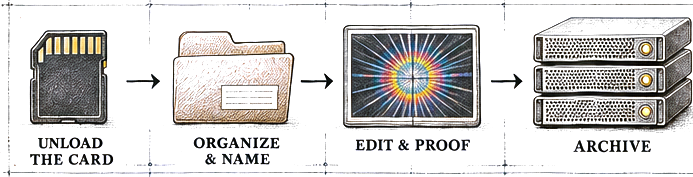
Know where the next shoot goes before you unload the card.
Set up a repeatable, year-first folder structure. Batch rename and add metadata while the job is fresh.


Give every shoot a folder, carry one filename from RAW to proof, and know where your backup lives. A $47 illustrated guide to the workflow I use on every job.
Online checkout is coming soon.
You recognize the JPEG. The shoot was three years ago, the folder was called “New Folder 3,” and the original might be on the only drive you haven’t plugged in.
Set up a repeatable, year-first folder structure. Batch rename and add metadata while the job is fresh.
Keep the same base filename from capture through proofs and delivery. See how I cull in Photo Mechanic, edit selects in Lightroom and carry names through export.
Verify your copies before you erase the card. Move the finished job to permanent storage and keep a separate offsite backup.
I used to put jobs on whichever drive had space. In my Capture One days, I gave JPEGs different names from their RAWs. Eventually I paid someone to sort out the archive. This is the workflow I built so the next shoot goes where it belongs.
Every file I make starts with my name. Then I add the date, shoot and frame number. Years later I can still tell what I’m looking at.
The guide shows how I use both. The naming, folder and backup practices work with Capture One and other editors, on Mac or Windows.
Start with your next shoot. Use the checklist once from card to archive, then bring older work into the system one drive at a time.
Use the naming workflow on new jobs first. Plan any renaming of existing files around the links your editing software already uses.